Layout canvas
Drag outputs on a canvas. Pixel size, coordinates and overlap are checked as you move them. Export the block into main.brs or as a SetVideoMode plugin block, and save a PNG of the layout for the install record.
BrightSign · Appspace · Windows
BrightSpace is a desktop tool for technicians who set up multi-output BrightSign players. Place each output on a canvas, check for overlap, then export the BrightScript block or patch it into your autorun.zip. It also routes HTML5 audio to more than one output.
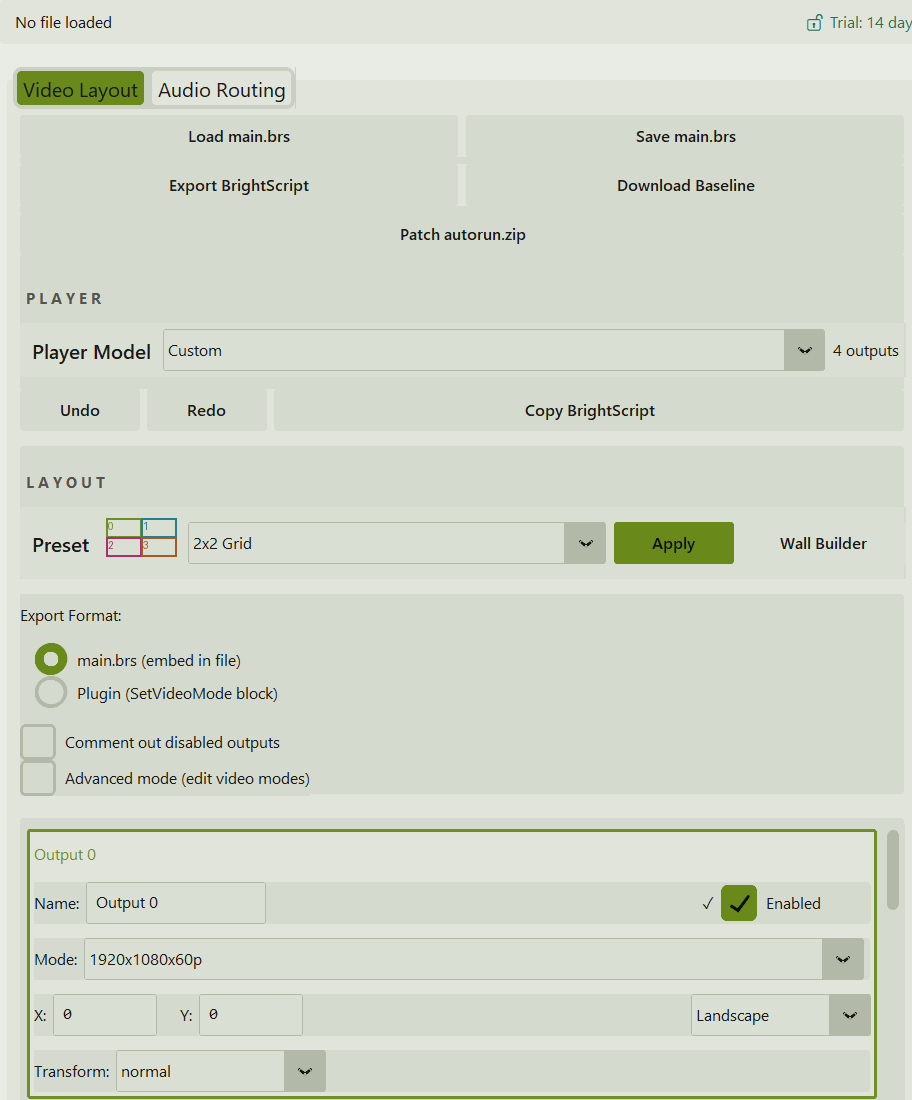
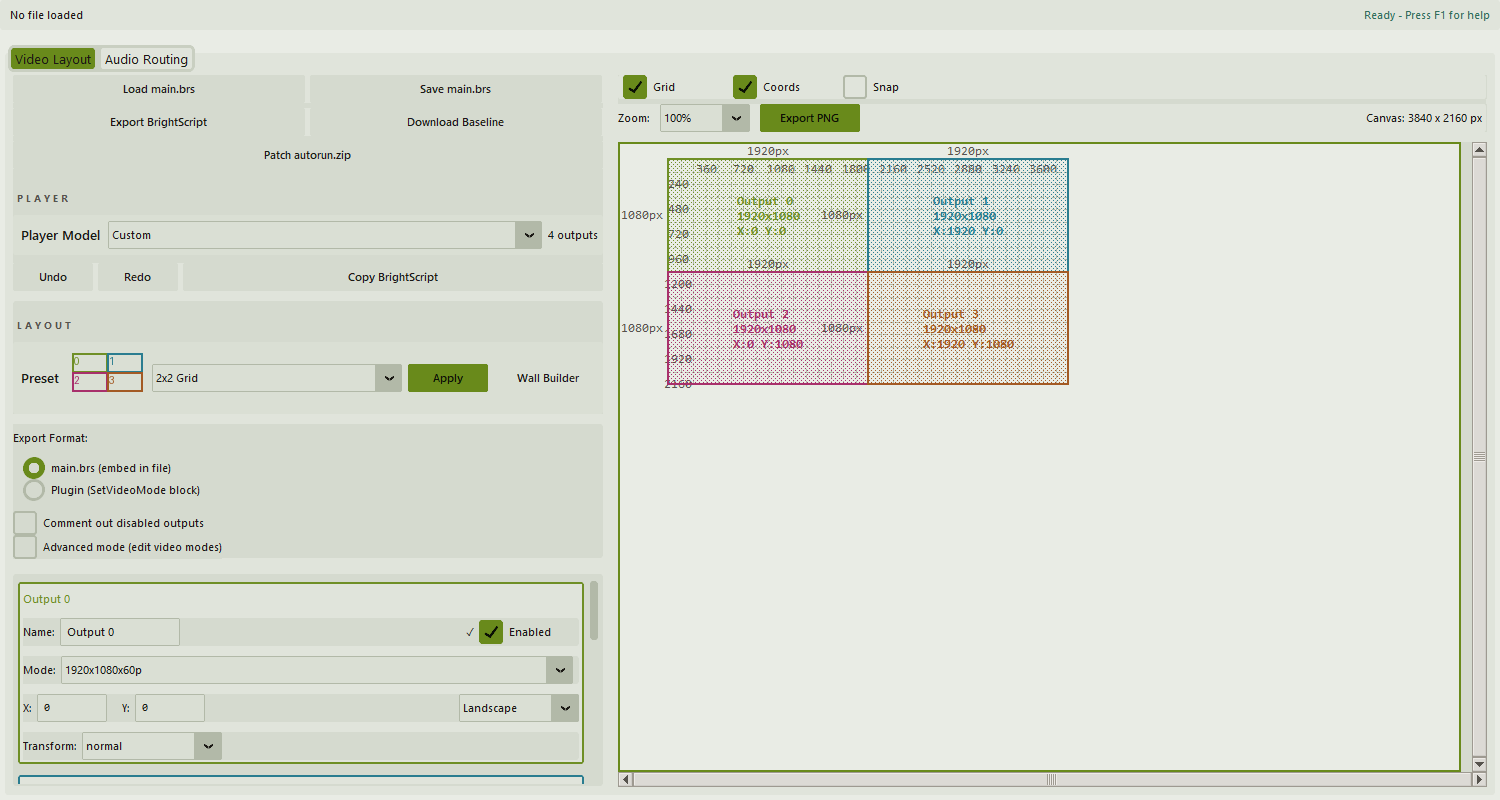
Drag outputs on a canvas. Pixel size, coordinates and overlap are checked as you move them. Export the block into main.brs or as a SetVideoMode plugin block, and save a PNG of the layout for the install record.
normal, rot90, rot180, rot270, flip and flop, set per output and written to the sm[] block. Portrait or landscape is the same setting as the transform, so the preview and the export cannot disagree.
Mirror HTML5 audio across HDMI and analog outputs by patching autorun.zip. Preview shows exactly what would change, your original zip is not modified, and a backup goes in a .brightspace_backups folder. This was the separate BAaudioALL tool.
HDMI2 audio works on the XC2055 and XC4055 (confirmed in the field 2026-07-20). hdmi3 and hdmi4 are selectable but have not been verified on any player.
Enter rows and columns, a panel mode and a bezel gap, and get the layout. If the wall needs more than one player it says so up front. A 2×3 wall is not quietly cut down to four outputs.
Write the layout into a copy of the autorun.zip the player actually runs. No unzipping appspace/main.brs by hand and re-zipping it.
Pick a BrightSign model and BrightSpace limits the outputs and video modes to what that model can drive. Where BrightSign has not published an output count, the app says so instead of guessing.
50 steps of undo and redo. Work in progress is auto-saved every 30 seconds and offered back after a crash.
From a single 4K output to 2×2 video walls and portrait strips. Save your own, import a colleague's, delete the ones you are done with.
Ctrl+O, Ctrl+S and Ctrl+E to open, save and export. Ctrl+Z and Ctrl+Y for undo and redo. Ctrl+D to duplicate an output, Ctrl+1-4 to focus one, F1 for help.
The built-in 2×2 Grid preset: four 1920×1080 outputs on a 3840×2160 canvas, and the block BrightSpace exports for it. Two of the four outputs are shown.
sm = vm.GetScreenModes()

' ----- Output 0 -----
sm[0].video_mode = "1920x1080x60p"
sm[0].transform  = "normal"
sm[0].display_x  = 0
sm[0].display_y  = 0
sm[0].enabled    = true

' ----- Output 1 -----
sm[1].video_mode = "1920x1080x60p"
sm[1].transform  = "normal"
sm[1].display_x  = 1920
sm[1].display_y  = 0
sm[1].enabled    = true

vm.SetScreenModes(sm)| Series | Player | Outputs | Max Res | Ports |
|---|---|---|---|---|
| Series 5 | XT2145 | 2 | 4K | HDMI x2 |
| XC2055 | 2 | 4K | HDMI x2 | |
| XC4055 | 4 | 4K | HDMI x4 | |
| Series 4 | HD1024 | 2 | 4K | HDMI x2 |
| XD234 | 2 | 4K | HDMI x2 | |
| XD1034 | 2 | 4K | HDMI x2 |
The app lists 24 BrightSign models plus a Custom entry for any player not listed, which is treated as a four-output unit. This table shows the multi-output models the tool exists for. Single-output players (XD235, XT1145, XT245, LS424, HD224) work for audio routing, because mirroring HTML5 audio across HDMI and analog does not depend on how many video outputs a player has, but there is no multi-output layout to build on one output. BrightSpace has no published output count for several players (Series 6: HD1026, HD226, XD1036, XD236, XS156; and XT1144, XT244). It reports those as unknown rather than guessing, and does not restrict a configuration it cannot verify.
Free
14 days, full features
$39 / year
Billed once a year through PayPal
After the trial ends, designing, previewing and loading files stay free. Exporting the BrightScript block, copying it, patching a zip and saving the PNG need a license.
Windows, 64-bit. Single exe, no installer, about 21 MB, signed as Mediagato LLC.
Enter your email and the download starts. The 14-day trial needs no credit card and no account. I will only email you about updates and discount codes.
Pay through PayPal. Your license key appears on this page as soon as the payment goes through.
Keys start with BAMOC-, the tool's name before it was BrightSpace. Paste the key into Help > Activate License. Questions: steve@mediagato.com

I build these tools because I use them. Your license works on any machine, one at a time. If a laptop dies or you move to a new workstation, enter your key on the new one. There is no deactivation step. Sign up for the newsletter and I will send discount codes and early access for future tools.
BrightSpace is one of a set of tools for signage technicians. Sign up below for launch updates: no spam, no data sales.
Fleet-health reports from AppSpace, BrightSign and Korbyt exports. Runs on your machine. SpaceCraft has been folded into it.
Available nowDesign multi-zone Appspace channels on a canvas, for every orientation and big-wall resolution, and export Appspace-ready JSON.
Available nowGenerates and updates BrightSign autorun.brs files with a signageOS Organization UID.
Drop your email. I will write when new tools ship, and that is all.